WMS Map Editor Dialog, Map Layers Section
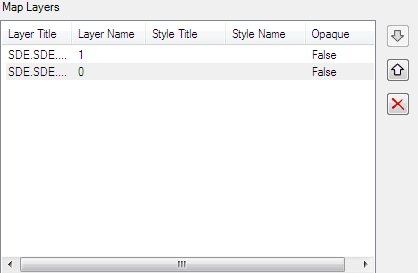
Displays information about the currently selected layers. Also contains controls to change the display order and to remove layers from a map.
| Setting | Description |
|---|---|
| Layer Title | Lists the titles of the selected layers. |
| Layer Name | Lists the names of the selected layers. |
| Style Title | Displays the style title of the layers. |
| Style Name | Displays the style name of the layers. |
| Opaque | Indicates whether the layer is opaque. If false: map data represents vector features that probably do not completely fill space. If true: map data are mostly or completely opaque. |
| Move Layer to Front | Use to move the selected layer towards the front of the map Z-order. |
| Move Layer to Back | Use to move the selected layer towards the back of the map Z-order. |
| Delete Layer | Use to remove the layer from the map definition. It is also possible to delete a layer by double clicking on the Layer line in the Map Definition section. |