
Group Note Update
 Used to update note1/note2
content to specified group note1/note2.
Used to update note1/note2
content to specified group note1/note2.

| Setting | Description |
|---|---|
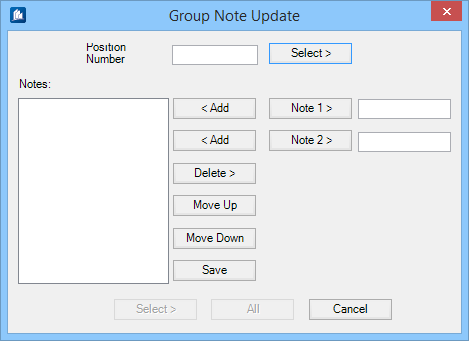
| Position Number | Indicates the position number of a selected object. Use the Select button to pick the object to select position number. |
| Notes | Displays the list note content added from note fields (Note1 > and Note2>). |
| Note1> / Note 2> | Edit note fields; Note1 the first and Note2 the second field content is stacked in the notes list. |
| < Add | Appends the corresponding note text/comment in the end of the notes list. |
| Delete > | Removed the currently highlighted note from the note list. |
| Move Up / Move Down | Moves the selected note item in the note list a position up or down . |
| Save | Saves the note list with updates note content. |
| Select | Enables selecting objects in the drawing for group note update. |
| All | All objects are selected to process note update. The selected object with position number. # object(s) with Position Number # is updated |