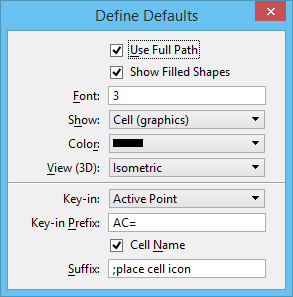
Define Defaults Dialog
Used to set the defaults for adding cells to a cell selector file and defining the cells' buttons.
Some of the defaults set in this dialog are used in the Define Button dialog.
| Setting | Description |
|---|---|
| Use Full Path | If on, shows the full cell library path in the Define Button dialog. |
| Show Filled Shapes | If on (the default), filled shapes in a cell appear as filled on the button. |
| Font | The number that represents the style of font used to display the name on the button. |
| Show | List box that allows you to choose how to display the cell in the Cell Selector dialog. The choices are Cell (graphics), Cell Name, Description, Cell and Name. |
| Color | List box that allows you to select the default color of the new buttons. |
| View (3D) | Allows you to select the orientation in which 3D cells appear. |
| Key-in | Opens a list box which allows you to choose which part of the cell component you want to use to set up the default key-in. The choices are Active Cell, Active Point, Active Pattern, Active Terminator, and User Defined. |
| Key-in Prefix | If an option other than User Defined is selected in the Key-in list box, the key-in associated with that selection appears. |
| Cell Name | If on, inserts cell as default key-in. |
| Suffix | Used to add a standard suffix to the default cell names. |