Breaking Rebar
To break rebar:
-
Select
 (Break
Rebar).
(Break
Rebar).
-
On your model,
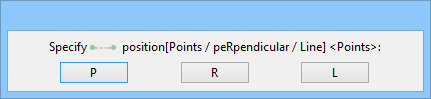
The pop-up prompt for selecting break position options appears: Select one of the break options to specify the position at which to break the bar(s):
Click to identify the bar that you want to break
or
<Ctrl+click> on a bar to break all bars in the same zone (such as the top, bottom, or side of a rebar cage).
- P – By Points; allows you to select first, followed by second point on the rebar.
- R – By Perpendicular Points; allows you to select a perpendicular point in the vew.
- L – By Line intersecting rebar; allows you to select the line.
- At the Key In Prompt, type the length of the break. The bar(s) are broken into two pieces.