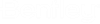
Collada Export Settings Dialog
| Setting | Description |
|---|---|
| Stroke Tolerance | Sets the maximum deviation between curved surfaces and their mesh approximation. It also can set the maximum deviation between curved geometry and their stroked vector approximation. |
| Transparency Override | If value is not zero, then all geometry exports with this transparency. |
| Render Mode | Sets the rendering mode, which can include From View. When set to From View, the display style for the selected view is used. |
| Convert Undisplayed Levels | If on, levels that are off in the current view export. If off, only levels that are displayed export. |
| Convert Custom Line Styles | If on, custom line styles are converted and appear similar to how they appear in ProStructures. If off, custom line styles are converted as simple lines. |
| Convert Rendered View Wireframes | If on, converts wireframe geometry such as open lines, arcs, curves, and annotations in rendered (non-wireframe) views. If off, wireframe geometry is not converted. |
| Write Double Sided Faces | If on, both the inner and outer faces are exported. If off, only the outer faces are exported. |
| Export |
Opens the Create Collada File dialog, which contains controls analogous to those in the Save As dialog.
|