
Fence Toolbox
The Fence toolbox contains tools that are used to place, modify, move a fence, and delete the fence contents.
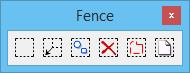
All tools in a toolbox are not always visible by default. To see all tools, right-click in the toolbox and select Show All from the menu.
| To | Select in the Fence toolbox |
|---|---|
| Place a fence. | Place Fence |
| Modify one vertex of a fence. | Modify Fence |
| Manipulate the fence contents. or Extend or shorten elements that overlap the fence. |
Manipulate Fence Contents |
| Delete the fence contents. | Delete Fence Contents |
| Break up the complex elements in the fence contents into their components. | Drop Complex Status of Fence Contents |
| Copy the fence contents to a new DGN file or Move the fence contents to a new DGN file |
Copy/Move Fence Contents to New File |


