
Design History Toolbox
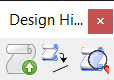
Tools in the Design History toolbox are used to:
- Record changes in design history
- Show conflicts (not available)
- Restore elements from history
- Show design history
All tools in a toolbox are not always visible by default. To see all tools, right-click in the toolbox and select Show All from the menu.
| To | Select in the Design History toolbox |
|---|---|
| Record and commit changes | Commit changes as a revision to design history |
| Restore Elements | Restore elements from history |
| Review design history | Show design history |
| Activate the model that contains (or used to contain) the selected element. | Use the HISTORY GOTOMODEL key-in. |
| Set or remove custom revision number formatting. | Use the HISTORY MANAGE SET REVISIONFORMAT key-in. |
| Review the open DGN file's revision number format specification. | Use the HISTORY MANAGE SHOW REVISIONFORMAT key-in. |


