
Arcs Toolbox
The tools in the Arcs toolbox are used to place and modify arcs.
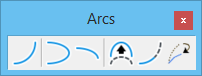
All tools in a toolbox are not always visible by default. To see all tools, right-click in the toolbox and select Show All from the menu.
| To | Select in the Arcs toolbox |
|---|---|
| Place a circular arc. | Place Arc |
| Place an elliptical arc with a sweep angle of 180°. | Place Half Ellipse |
| Place an elliptical arc with a sweep angle of 90°. | Place Quarter Ellipse |
| Modify a circular arc's radius, sweep angle, and center. | Modify Arc Radius |
| Extend or shorten an arc's length (sweep angle). | Modify Arc Angle |
| Lengthen or shorten an axis of an arc. | Modify Arc Axis |


Note: To modify a circular arc's radius (or both axes of an elliptical arc), without changing the center or sweep angle, use the Element Selection tool.