
Standard Toolbox
The Standard toolbox contains icons that enable quick access to commonly used pull-down menu items.
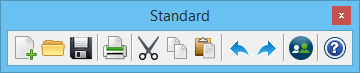
All tools in a toolbox are not always visible by default. To see all tools, right-click in the toolbox and select Show All from the menu.
| Selecting this icon | Has the same effect as choosing | Result |
|---|---|---|
| New | Creates a file. | |
| Open | Opens an existing file. | |
| Save | Saves the current open file. | |
| Prints the contents of the view in the active model. | ||
| Cut | Deletes selected item(s). | |
| Copy | Copies selected item(s). | |
| Paste | Pastes selected item(s). | |
| Undo | Quick Access Toolbar > Undo (action) | Undoes last operation. |
| Redo | Quick Access Toolbar > Redo (action) | Repeats last action. |
| MicroStation PowerDraft Community | Opens your Bentley Communities website. | |
| Help | Accesses online help. |


