
Image Server Settings Dialog
The Image Server utility requires that a Bentley publishing server be installed.
Use this dialog to create new or to modify existing server configuration files.
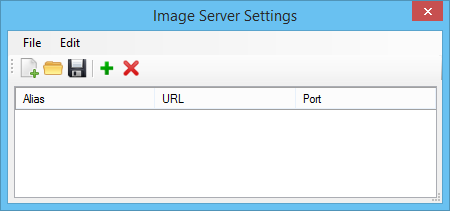
| Setting | Description |
|---|---|
| File > New | Lets you create a new server configuration file. |
| File > Open | Lets you open an existing server configuration file. |
| File > Save | Saves the displayed settings to the currently open server configuration file. |
| File > Save As | Lets you save the current settings to a new server configuration file. For information about setting an image server, see Image Display. |
| Edit > Add Alias | Lets you add a server to the list. |
| Edit > Delete Alias | Lets you delete the selected server from the list. |
| Edit > Delete All Alias | Lets you delete all servers from the list. |
| New File icon | Lets you create a new server configuration file. |
| Open File icon | Lets you open an existing server configuration file. |
| Save File icon | Saves the displayed settings to the currently open server configuration file. |
| Add Alias icon | Lets you add a server to the list. |
| Delete Alias icon | Lets you delete the selected server from the list. |
| Alias list box | Displays the server alias names for the current server configuration file. |


