
HTML Cell Page Dialog
Used to create an HTML file from a cell library.
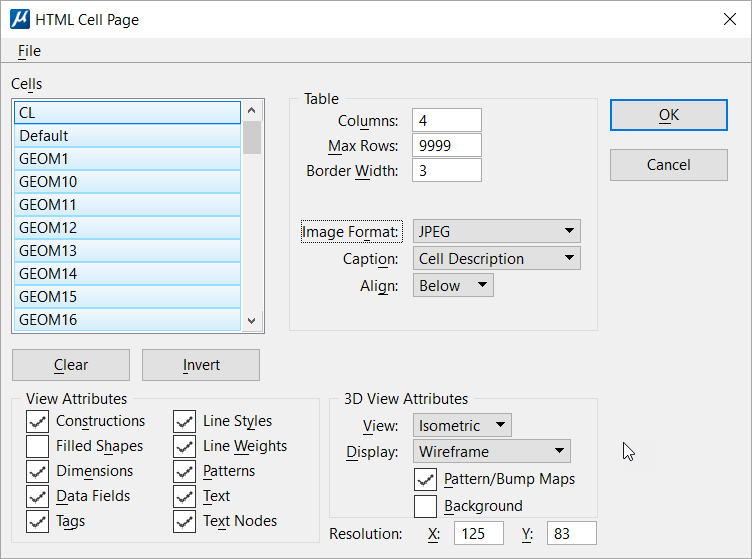
From the HTML Author dialog ( ), selecting Cell Library opens the Select Cell Library to Open dialog. After you select a cell library, the HTML Cell Page dialog opens.
| Setting | Description |
|---|---|
| File > Cell Library… | Used to select a cell library to be referenced in an HTML file. |
| File > Design File… | Used to select a design file to be referenced in an HTML file. |
| File > Design File Snapshot… | Used to select a design file whose snapshot is referenced in an HTML file. |
| File > Exit | Used to exit the HTML Cell Page dialog. |
| Cells | Lists all the cells in the cell library. You can select any or all cells in the library to be included in the HTML page. |
| Clear | Clears all the cells selected for inclusion in the HTML page. |
| Invert | Selects all unselected cells and unselects all selected cells for inclusion in the HTML page. |
| Resolution | The width (X) and height (Y) in pixels of the generated image. |
| OK | Accept the changes and opens the Create HTML File dialog. |