
Bing Maps Tool
 Used to controls the settings and
operation of the Background Map using Bing Maps.
Used to controls the settings and
operation of the Background Map using Bing Maps.
You can access this tool from the following:
| Setting | Description |
|---|---|
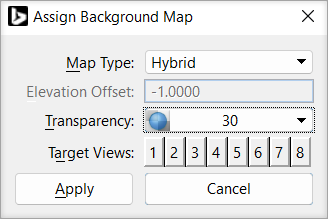
| Map Type | Allows you to select the type of background map to be displayed. Options are None, Road, Aerial, and Hybrid. |
| Elevation Offset | (Available only for 3D design model) Defines the distance above or below the Z=0 plane at which the background data is drawn. For 3D data, it depends on the elevation of the data in the model. |
| Transparency | Allows you to set the transparency of the background data. |
| Target Views | Allows you to set the view index in the active model. |