
Cut Solid with Curve
 Used to cut solids using
a profile. It requires at least one 2D profile and a solid to operate. It
can, however use more than one profile and multiple solids in a single
operation. The profile can be "open" (linear elements such as a Line or Complex
chain) or "closed" (such as a Shape). Open profiles must extend to (or beyond)
the boundaries of the solid.
Used to cut solids using
a profile. It requires at least one 2D profile and a solid to operate. It
can, however use more than one profile and multiple solids in a single
operation. The profile can be "open" (linear elements such as a Line or Complex
chain) or "closed" (such as a Shape). Open profiles must extend to (or beyond)
the boundaries of the solid.
| Setting | Description |
|---|---|
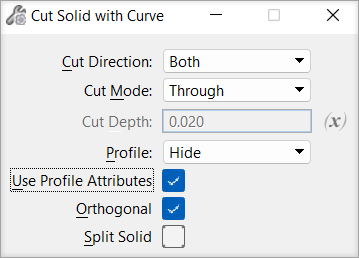
| Cut Direction | Sets the direction of the cut, which is relative to the profile's surface normal. |
| Cut Mode | Sets the limits of the cut. |
| Cut Depth | (Cut Mode set to Define Depth only) Sets the cut's projection distance. |
| Variable Link | Let's you use an existing variable to set the input value, defined in the Variables dialog. |
| Profile | Sets the behavior of the profile after the feature
is created.
|
| User Profile Attributes | If on, uses the attributes of the profile element for the cut feature. If off, uses the attributes of the solid for the cut feature. Default is Off. |
| Orthogonal checkbox | If on, let you create an orthogonal cut. If off, lets you create a non-orthogonal cut on a solid. This checkbox is on by default. |
| Split Solid checkbox | If on, the edges of the profile are used to cut the solid, but no material is removed. This checkbox is off by default. |
