
Animation Cameras Toolbox
The Animation Cameras toolbox contains tools that are used to create and script animation cameras and targets.
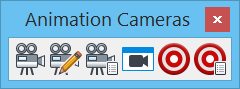
All tools in a toolbox are not always visible by default. To see all tools, right-click in the toolbox and select Show All from the menu.
| To | Select in the Animation Cameras toolbox |
|---|---|
| Create an animation camera. | Create Animation Camera |
| Modify an animation camera. | Modify Animation Camera |
| Specify the frame number at which to begin using an animation camera. | Script Camera |
| Display, in a view, the view from an animation camera. | Camera View |
| Create a target for an animation camera. | Create Target |
| Specify the frame interval during which to use an animation camera target. | Script Target |


Note: Animation cameras and targets are created as Construction class elements. They are not visible unless the view attribute Constructions is turned on in the View Attributes dialog (Settings menu > View Attributes or from a view window control menu).