
Protect Dialog
Used to place protection on a file. Files can be protected via certificate or password.
You can access this dialog from the following:
The Protect dialog looks different based on the settings in the MS_PROTECTION_ENABLE configuration variable.

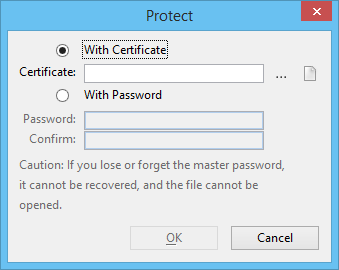
| Setting | Description |
|---|---|
| With Certificates | File is protected with a digital certificate. |
| Certificates | Name of the certificate protecting the file. |
| Choose Certificate icon | Opens the Certificates dialog listing certificates installed on your machine. |
| Certificate files icon | Opens the Certificate files dialog for browsing certificate files on your machine. |
| With Password | File is protected with a password. |
| Password | Password that allows access to the file. |
| Confirm | Confirmation of the password being set up to control access to the file. |