
Import CGM File Dialog
Used to adjust the import settings for the CGM file selected in the Open Computer Graphics Metafile dialog.
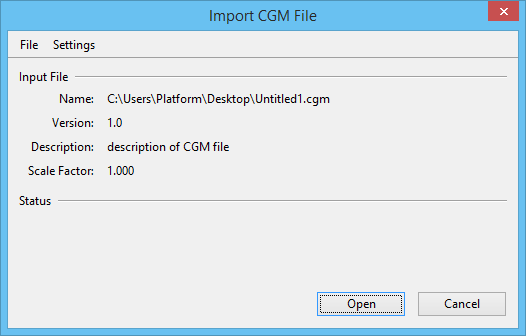
| Setting | Description |
|---|---|
| Input File | Shows the CGM file's name, version, description, and scale factor. |
| Status | During the file conversion, displays messages about its progress. |
| Open | Imports the CGM file. |
| File menu > Settings File > Attach | Opens the Attach Settings File dialog, which is used to attach an import settings file. |
| File menu > Settings File > Save | Saves the import settings in the attached import settings file. |
| File menu > Settings File > Save As | Opens the Save Settings File dialog, which is used to save the import settings in a new import settings file. |
| File menu > Log File | Opens the Log File dialog, which is used to specify an alternate Log file. |
| Settings menu > General | Opens the CGM Import Settings dialog, which is used to set general CGM import settings. |
| Settings menu > Text Fonts | Opens the (CGM Import) Text Fonts dialog, which is used to set how CGM fonts are converted to MicroStation fonts. |
| Settings menu > Levels | Opens the (CGM Import) Levels dialog, which is used to set how CGM layers are converted to MicroStation levels. |
| Settings menu > Line Styles | Opens the (CGM Import) Line Styles dialog, which is used to set how CGM line types are converted to MicroStation line styles. |
| Settings menu > Weights | Opens the (CGM Import) Weights dialog, which is used to set how CGM polyline widths are converted to MicroStation line weights. |