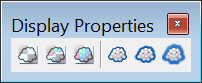
Display Properties tool
|
Used to |
Select in the Display Properties toolbox |
|---|---|
|
Set the density of the attached point clouds to 20%. |
Set Density to Low |
|
Set the density of the attached point clouds to 50%. |
Set Density to Medium |
|
Set the density of the attached point clouds to 100%. |
Set Density to High |
|
Set the weight of the attached point clouds to 0. |
Set Weight to Low |
|
Set the weight of the attached point clouds to 2. |
Set Weight to Medium |
|
Set the weight of the attached point clouds to 4. |
Set Weight to High |


