3D Line Following tool settings
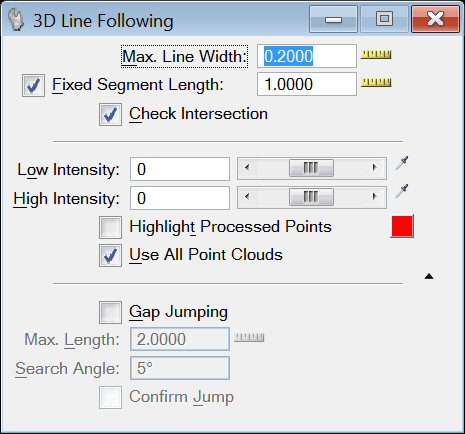
| Setting | Description |
|---|---|
| Max Line Width |
The maximum width to search for points. |
| Fixed Segment Length |
Line segments will be drawn at the specified length. |
| Check Intersection |
Look for intersections. |
| Low Intensity |
The lowest intensity to process. |
| High Intensity |
The highest intensity to process. |
| Highlight Processed Points | When turned on, the points that have intensities within "Low Intensity" and "High Intensity" are highlighted using the user defined color. |
| Use All Point Clouds |
Use all attached point clouds during processing. |
| Gap Jumping |
Causes the process to jump gaps. |
| Max Length |
Maximum length of gap to jump and still consider the line to be solid. |
| Search Angle |
Maximum angle to deviate while looking for points to process. |
| Confirm Jump |
Confirm if a gap should be jumped. |
| MeasureTool |
Used to measure the distance directly from the model. |
| Select Intensity |
Used to select the intensity directly from the point cloud. |

