
Model by Section tool settings
Model by Section requires a defined template (from the Template tab) and a defined section (from the Section tab).
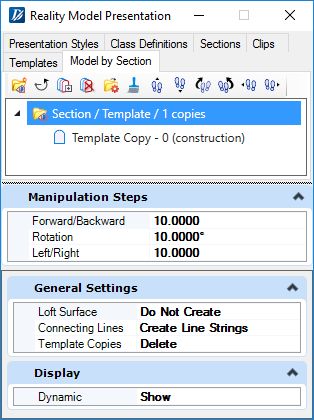
Project Tools
| Setting | Description |
|---|---|
| Create |
Creates a new Model by Section Project. |
| Reset |
Resets the project and deletes all template copies. |
| Append Template Copy |
Places a template copy in the section view. |
| Delete Template Copy |
Deletes the selected template copy. |
| Generate |
Generates the graphic objects defined in Generate Settings. |
| Preview Loft Surface |
Previews the graphic objects defined in Generate Settings. |


Section Manipulation Tools
| Setting | Description |
|---|---|
| Move Forward |
Moves the section forward by the amount specified in the forward / backward step setting. |
| Move Backward |
Moves the section backward by the amount specified in the forward / backward step setting. |
| Rotate Clockwise |
Rotates the section clockwise by the amount specified in the rotation step setting. |
| Rotate Counterclockwise |
Rotates the section counterclockwise by the amount specified in the rotation step setting. |
| Move Left |
Moves the section left by the amount specified in the left / right step setting. |
| Move Right |
Moves the section right by the amount specified in the left / right step setting. |
| Reset |
Resets the section back to its original position and orientation. |


