| Area |
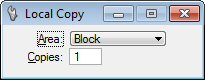
Used to select the area to copy.
-
Block: Using the pointer, select two data points to create a block to copy.
-
Oriented Block: Using the pointer, select two data points to create an oriented block to copy.
-
Element: Using the pointer, select an existing closed vector element to copy.
-
Shape: Using the pointer, draw a shape to copy.
-
Item: Identify the item whose external boundary will be taken as the image area to copy. For binary rasters only.
|
| Copies |
Sets the number of copies to create.
|